
Shenzhen Southern Machinery — SMT / THT equipment design and manufacturing since 2011
Southern Machinery logo Southern MachinerySMT / THT equipment and feeders
Axial through-hole insertion — servo-driven, any angle

S4000 Axial Insertion Machine
for Smart EMS THT PCB Assembly

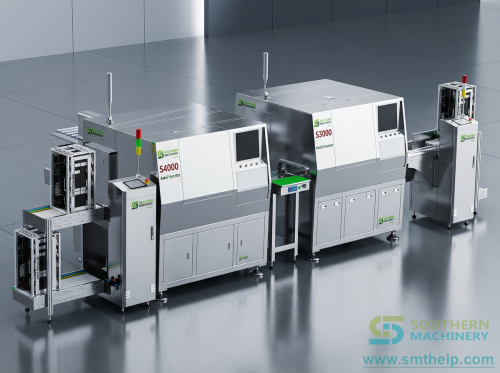
The S4000 inserts taped axial components — diodes, resistors and jumper wire — into through-holes at any angle, cuts and forms the leads, and clinches them in one continuous cycle. A modular feeder bank from 5 to 60 stations, dual jumper-wire feeders, machine-vision hole correction and an MES-ready data path.

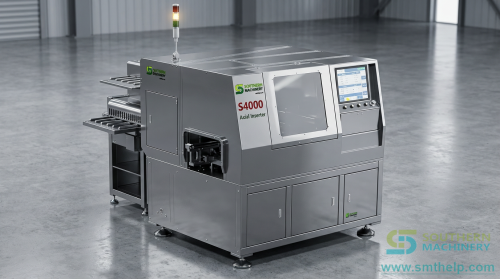
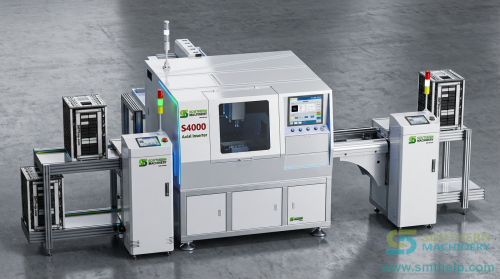
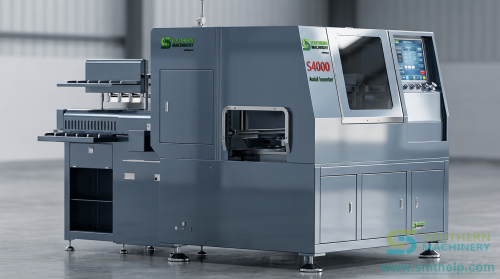
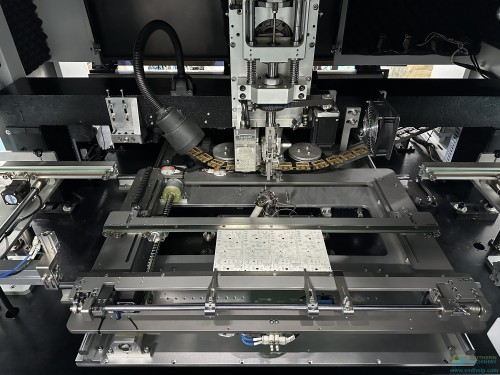
S4000 axial insertion machine, front view S4000 axial inserter — 1700 x 1500 x 1600 mm, 880 kg (2024 brochure)
20,000 CPH
Published top speed (specification figure)
10,000 CPH
Published actual speed in the same brochure
5 – 60
Feeder stations, modular and expandable
0.3 – 0.8 mm
Lead diameter accepted, jumper wire included
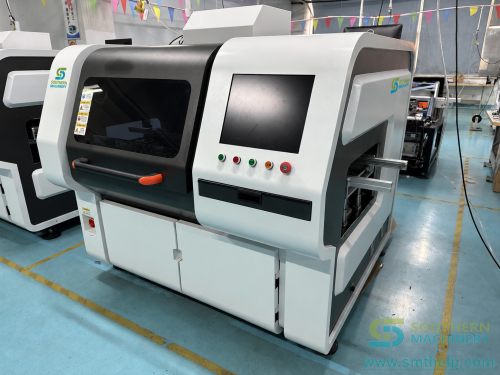
Every figure attributed to the document it came from Conflicting values shown side by side, never averaged Unconfirmed values marked To be confirmed Photographs of other models in the family are labelled as such
Why automate axial insertion

Axial parts are the last hand-loaded operation on most THT boards

SMT took the chips. Radial inserters took the capacitors. What is left on the bench is usually the axial band — resistors, diodes and the jumper wires that tie a board together. Those parts are cheap, they arrive on tape, and they are still being placed by hand because the volume never looked high enough to justify a machine. That calculation changes when you cost it per board instead of per part.

01

One cycle instead of four hand movements

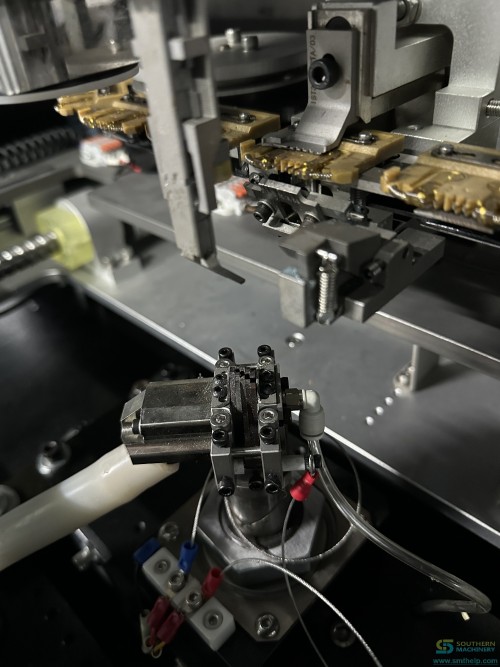
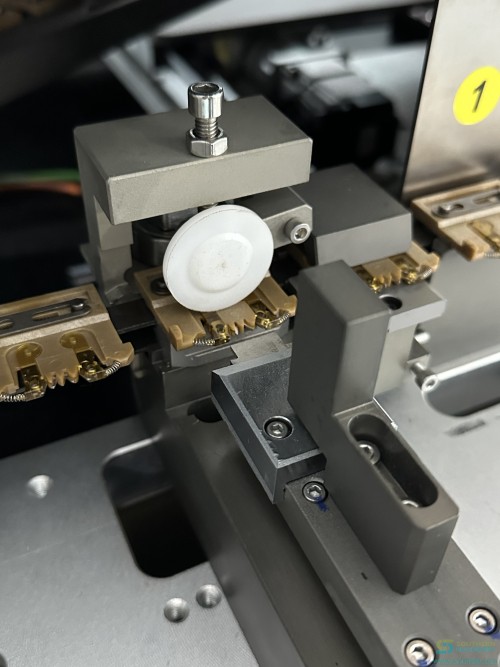
A hand operator picks the part, checks the polarity, bends the leads to the hole pitch, inserts it, then turns the board over to clinch. The S4000 does all of that inside one insertion cycle: the head cuts the leads off the chain, forms them, pushes them through the holes, and the lead cutter beneath the board clinches them. The insertion head carries three symmetric tool pairs — upper cutter, upper forming tool and pusher — driven up and down on the H axis.

02

Any angle, not just 0 and 90 degrees

The PCB sits on a servo-driven rotary table. The R axis turns the board to the programmed angle for each line of the insertion program, so a layout that needs a 30-degree diode or a diagonal jumper no longer forces that part back onto the bench. The manual describes it as insertion at any angle in a prearranged sequence, with the rotation angle stored per program line.

03

Jumper wire without a taping step

Barrel-fed jumper wire is straightened in the Z and Y directions and delivered to the lower cutter by a dedicated W-axis motor, then inserted by the insertion shaft. The 2024 brochure states the machine supports direct jumper-wire insertion without tapes, and that a dual-feeder arrangement handles two wire specifications — 0.5 mm and 0.6 mm — at the same time. Southern Machinery documents this as saving one third of the jumper wire during insertion.

How it inserts

From a taped reel to a clinched lead in six stages

The sequence below is the machine's own description of its mechanism, taken from the S4000 series manual. Each stage names the subassembly that performs it, because when a line stops you need to know which of them to look at.

01

Feed

The distribution head cuts tape-and-reel components one by one on the program's instruction and drops each one into a link of the discharge chain. A stepper motor drives the head; the outlet sits about 5 mm from the centreline of the receiving plate's V-slot.

02

Transfer

Pickup wheels move components between the discharge chain and the two insertion chains. A hold-down plate stops parts jumping out of the grooves, and centering stoppers begin aligning them as they pass.

03

Centre

The centering mechanism clamps the component at the centre of its body length before insertion. Without it, a misaligned part gets its body cut or its leads bent asymmetrically. Two chain clamps close on the part under spring pressure and hold it.

04

Cut

The upper cutter descends and works with the lower cutter to sever the component leads from the chain clamp. Cutting length is adjustable from 1.2 to 2.2 mm. The lead-cutting cylinders are insulated from each other and from the metal base so the machine can detect insertion status electrically.

05

Form

The upper forming tool and lower forming tool bend the leads outward into the shape the manual calls the eight-character form, so the part sits flat and the leads enter the holes square. Bending angle is adjustable from 0 to 35 degrees.

06

Insert and clinch

The pusher drives the formed leads down into the PCB holes, the lead cutter below the board trims and clinches them, and the three tool pairs retract. The lead cutters rise with the insertion head and lower after insertion; the B-axis servo drives them through a gear and rack.

Verified material Mechanism descriptions, the 1.2–2.2 mm cutting range and the 0–35 degree bending range are from the S4000 Axial Insertion Machine Series Manual V1.1. Illustrations in this section are text only; the machine photographs further down are of the S4000 and are labelled where a picture shows a different model.

The seven axes, in the machine's own names

AxisFunction as described in the manualDrive
XMoves the worktable left and right; ball screw with two linear guide rails, coupling between screw and motor.Servo, absolute
YMoves the worktable front to back on a ball screw; the R worktable is carried on the Y table.Servo, absolute
RRotary table. Turns the PCB to the programmed insertion angle; circular guide rail and rotary disk driven by the R-axis reducer through a timing belt.Servo, absolute
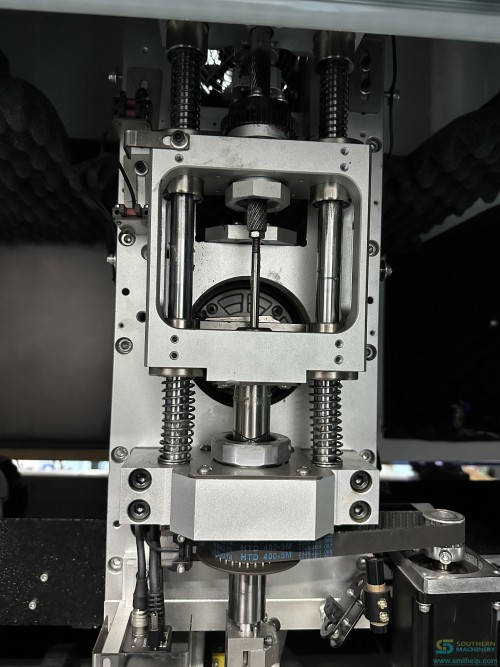
HInsertion axis. Raises and lowers the three tool pairs in the cassette; gear shaft meshed with a rack.Servo, absolute
UWidth or span axis. One motor drives two opposed lead screws so the left and right tool sets open and close together to match the hole pitch.Servo, absolute
BBase vertical axis. Drives the lead cutters up and down through a gear and rack; shares its drive system with the U axis for synchronised span changes.Servo, absolute
CChain axis. Drives the insertion chains and the discharge chain from the main shaft, with a zero-position detection disk at the end of the shaft.Servo via gearbox
WJumper axis. Straightens the jumper wire and drives a gear pair to deliver a set length to the lower cutter.Servo, absolute

Verified material Axis names and functions: S4000 Series Manual V1.1 section 2 and Software & Programming Manual V2.6.0.0 section 6.1.3. The manual notes that the absolute servo drive removes dozens of photoelectric switches, and that soft adjustment removes the need for mechanical adjustment of the span.

Specification

Specification with its source named

Every row below comes from one of three documents Southern Machinery holds on this machine. Where the 2024 product brochure and the series manual give the same figure, both are cited. Where they differ, the next section shows both values side by side instead of picking one.

ItemValueSource document
ModelS4000 Axial InserterS4000 Axial Insertion machine 2024 (product brochure)
Top speed20,000 CPHBrochure and series manual (manual states 20,000 points per hour)
Actual speed10,000 CPHS4000 Axial Insertion machine 2024 (product brochure)
Component typesAxial tape-and-reel packages: diodes, resistors, jumper wire. Barrel-fed jumper wire fed independently.Brochure and series manual
Lead diameter0.3 – 0.8 mmBrochure and series manual (manual states tinned copper wire)
Insertion angleAny angle, adjustable, on the servo rotary tableS4000 Series Manual V1.1, section 1.3 item 5
Lead cutting length1.2 – 2.2 mm (adjustable)S4000 Series Manual V1.1, section 1.3 item 10
Lead bending angle0 – 35° (adjustable)S4000 Series Manual V1.1, section 1.3 item 11
Component height allowed15 mm standard, customisable on requestS4000 Series Manual V1.1, section 1.3 item 8
Available PCB size50 x 50 mm to 400 x 300 mm (brochure) / maximum 330 x 300 mm (manual)Conflicting — both values shown in the disclosure table below
PCB thickness0.79 – 2.36 mmBrochure and series manual
Component lead span5.00 – 20.00 mm (brochure) / 5.0 – 22 mm (manual)Conflicting — both values shown in the disclosure table below
Feeder stations5 / 10 / 20 / 30 / 40 / 50 / 60 available (brochure) / 10 / 20 / 30 / 40 configurable (manual)Conflicting — both values shown in the disclosure table below
Hole position correctionMachine vision automatic alignment, multi-point MARK correctionS4000 Series Manual V1.1, section 1.3 item 13
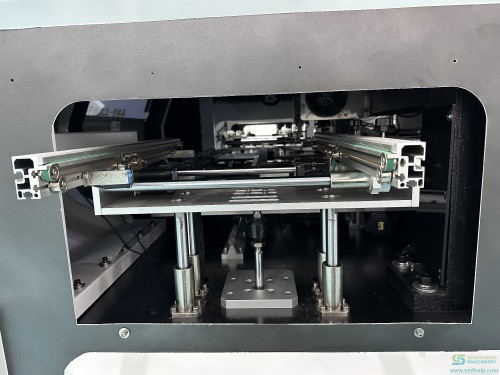
PCB conveyingIn-line automatic loading and unloading, left to right or right to left, with a custom manual version availableS4000 Series Manual V1.1, section 1.3 item 14
Drive systemCustom absolute servo drive, eliminating dozens of photoelectric sensorsS4000 Series Manual V1.1, section 1.3 item 15
Control systemBus-based multi-axis control, EtherCAT motion control card, industrial PC with routerSeries manual section 1.3 item 16 and brochure page 3
Operating systemChinese / English interface on a Windows 7 control platform (manual) — brochure lists Windows-based operationSeries manual section 1.3 item 17 and brochure page 3
Data inputUSB input in Excel file format; online and offline program editing both supportedS4000 Series Manual V1.1, section 1.3 items 12 and 18
Smart factory4G IoT, MES-compatible, black-box data loggingS4000 Series Manual V1.1, section 1.3 item 19
Machine dimensionsMain machine 1780 x 1500 x 1600 mm; auxiliary machine 500 x 900 x 1000 mm; 10-station material station 850 x 900 x 1360 mm; 20-station material station 1400 x 900 x 1360 mmS4000 Series Manual V1.1, section 1.3 item 21
Weight850 kg standard version (manual) / 880 kg (brochure)Conflicting — both values shown in the disclosure table below
Power supplySingle-phase AC 220 V, 50/60 Hz, 1.6 kW (L+N+E)Brochure and series manual
System protectionMultiple protections including an isolation transformerS4000 Series Manual V1.1, section 1.3 item 24
Air source0.6 – 0.8 MPa (brochure) / 0.5 – 0.7 MPa (manual)Conflicting — both values shown in the disclosure table below
Air consumption0.3 m³/minS4000 Series Manual V1.1, section 1.3 item 26
Operating ambient temperature5 – 28 °CS4000 Series Manual V1.1, section 1.3 item 27
Machine noise65 – 75 dBS4000 Series Manual V1.1, section 1.3 item 28
Insertion defect rate< 500 PPMS4000 Series Manual V1.1, section 1.3 item 2

Verified material Source documents: S4000 Axial Insertion machine 2024 (brochure, 15 pages) and S4000 Axial Insertion Machine Series Manual V1.1, updated 2023-02-14. Nothing on this page is taken from a competitor datasheet or a generic industry article.

Open points

Where the documents disagree, both values stay on the page

The 2024 brochure and the series manual were written for different purposes and were not updated in step. Seven figures differ. Rather than average them or silently pick the friendlier one, Southern Machinery prints both and names the source, so you can put the right number in your own project file and ask us to confirm the rest at quotation stage.

Why this matters to you. A footprint figure decides whether the machine fits the bay you have. A lead-span figure decides whether your part can run at all. If you size a bay on the brochure's 1700 mm and the machine that arrives follows the manual's 1780 mm, you have an installation problem. The honest answer is that the number depends on configuration, and configuration is what we agree with you before the order.
Item 2024 product brochure S4000 series manual V1.1 What it changes for you
Machine dimensions1700 x 1500 x 1600 mmMain 1780 x 1500 x 1600 mm + auxiliary 500 x 900 x 1000 mmBay width and floor layout. The 80 mm difference plus the auxiliary frame decides whether the line fits.
Weight880 kg850 kg standard versionFloor loading and the lifting plan for installation. 30 kg is inside normal configuration variance.
Maximum PCB size400 x 300 mm330 x 300 mm, customisable on requestWhether your largest panel runs as standard or as a custom build. Ask before you commit the panel design.
Component lead span5.00 – 20.00 mm5.0 – 22 mmWhether your widest axial part is inside the standard range. Parts above 20 mm may need confirmation.
Feeder stations5, 10, 20, 30, 40, 50, 60 stations available10 / 20 / 30 / 40 stations, configurable as neededHow many part numbers you can run without a reel change. 50 and 60 station frames are listed in the brochure only.
Air source0.6 – 0.8 MPa0.5 – 0.7 MPaWhat your house compressor has to deliver. Specify the higher figure if you want margin.
Speed statement20,000 CPH top and 10,000 CPH actual, both printed20,000 points per hour, listed as maximumYour capacity plan. The brochure is the only document that gives a separate actual figure, and it is half the top figure.

Both sources shown Values are quoted verbatim. No figure on this page has been averaged, rounded toward a better answer, or taken from a third document.

Throughput

What 20,000 points an hour actually buys you

The headline speed and the number you can plan a shift around are not the same number, and the S4000 documents are unusually honest about that: the brochure prints both. Here is how to use them without over-promising to your own production manager.

SPECIFICATION

20,000 points per hour

This is the machine's stated ceiling — the axis speeds and cycle timings at their design limit, with an ideal component and an ideal board. It is the right number for a datasheet comparison and the wrong number for a capacity plan.

PLANNING

10,000 CPH actual

The 2024 brochure prints a separate actual-speed figure of half the ceiling. Use this one for shift planning and payback arithmetic. It is also the figure that survives contact with a real mix of parts, board transfer time and operator intervention.

CONFIRM

Your board's number

Neither figure tells you what your specific board will run at, because insertion count, part spread, span changes and board size all move the answer. That is what the free demo is for: ten of your bare boards, your component list, and a measured rate at the end of it.

The throughput levers, ranked by how much they usually move the answer

LeverEffect on realised rateHow it is controlled
Number of parts per boardDominant. A board with 60 axial parts takes six times the insertion time of a board with 10, before any other factor.Program design; where a part can move to SMT or to a radial machine, the axial count drops.
Span changes within the programHigh. The U axis has to open or close the tool sets to the new hole pitch, and the lead cutters follow.Group parts by span when the layout allows it. The program list records the span per line, so this is visible before the board runs.
Rotation angle changesModerate. The R axis re-orients the table for each programmed angle.Sequence the program by angle where the board allows, so the table turns fewer times.
Feeder station countIndirect but large. Too few stations means reel changes mid-run, and every change is a stop.Size the feeder bank against the part count of the whole product family, not the current job.
Board transfer and clampingFixed per board. The stopper, clamp and conveyor cycle repeat regardless of part count.Amortised by running larger panels; panelisation in the software builds the multi-board program quickly.
Component feed reliabilityMultiplicative when it goes wrong. A jam stops the machine rather than slowing it.Feed mechanism alignment: the three centrelines between distribution head, discharge chain and chain-track guard plates must be coincident, and the chain tension set to 3–5 degrees of slack.

Verified material To be confirmed Speed figures are quoted from the two source documents. The lever ranking is Southern Machinery's engineering judgement from the machine's mechanism description, not a measured throughput table — treat it as a discussion order for the demo, and confirm the real numbers on your own board.

What you choose

Six decisions that shape the machine you receive

The S4000 is configured, not ordered off a shelf. These are the choices that change the price, the footprint and what the machine can run — and the ones worth settling before a purchase order rather than after.

01

Feeder bank size

The feeder bank is modular, so the station count is specified at order and expanded later. Southern Machinery lists combinations from 5 to 60 stations; the manual lists 10, 20, 30 and 40 as configurable. Count the axial part numbers across the whole product family you expect to run in the next three years, then add two spare stations for the parts nobody has designed yet.

02

Dual jumper-wire feeders

Two jumper-wire feeders let the machine run two wire specifications — 0.5 mm and 0.6 mm — without a changeover. The brochure states the machine supports direct jumper-wire insertion without tapes, and that it handles both reel-style and drum-style jumper wire packages with anti-jam feeding. If your boards use more than one wire gauge, this is the option that keeps both in the program at once.

03

Automatic PCB loading

A standard automated PCB loading device is offered so the machine can sit in an in-line flow rather than being hand-fed. The brochure states this arrangement lets a single operator manage three to five machines. Conveying direction is selectable left-to-right or right-to-left, and a custom manual version is available if you want to start without the loader.

04

Built-in air storage tank

The brochure lists a built-in air storage tank as a standard feature, described as smoothing the air supply so insertion quality stays consistent and maintenance effort drops. It matters most where the house air supply is shared with other machines and the pressure dips when a neighbour cycles.

05

Built-in 3 kVA regulator

A built-in 3 kVA regulator is listed as standard, described as reducing circuit failures and downtime by holding the supply steady. The manual adds that the control system requires all electrical systems of the machine to be reliably grounded, and that the protection set includes an isolation transformer.

06

Component height and board size

Standard component height allowance is 15 mm and the manual notes it is customisable on request. Maximum board size is listed as 330 x 300 mm in the manual and 400 x 300 mm in the brochure, and the manual adds that board size is customisable. If your panel is outside the standard envelope, say so at enquiry stage rather than at installation.

Verified material Feature descriptions: S4000 Axial Insertion machine 2024 brochure pages 5, 8, 10, 11 and 12, and S4000 Series Manual V1.1 sections 1.3 and 1.4.

Installation

What commissioning actually involves

Most of the risk in an axial line sits in the two weeks around installation, not in the machine. The software manual documents the commissioning sequence in enough detail that you can see what your engineers will be asked to do.

Axis zeroing and limits

Each axis is zeroed from the engineer page and the procedure differs per axis: the X axis moves to the far right and releases the coupling, the Y axis moves to the topmost position, the H axis needs the timing belt removed, the U axis the timing belt, the R axis the timing pulley, and the C axis the reducer coupling. Soft limits are then set from a displacement operation. This is also the procedure after replacing a servo drive, motor, coupling, timing belt or timing pulley — so it is worth having on file long after installation.

Program creation on the machine

A new program starts by marking the insertion positions on the board at 0 degrees and then at 90 degrees, positioning the board on the middle rail, and stepping the camera to each hole to confirm coordinates. The program list stores insertion sequence, coordinates, rotation angle R with sign for direction, span, feeder number, component model and a program function code where OS is an offset position, I an insertion, S a skip, MK a vision alignment line and E the end line.

Panelisation for multi-board panels

Where several small boards share one panel, the software builds the program from one board. You complete the first board's program, enter the panel count in X and Y, acquire the top-left and bottom-right coordinates, calculate spacing, preview the result, choose the sorting method and execute. Automatic coordinate correction then re-checks every generated position.

Diagnostics and feeder testing

The equipment status page shows the live state of every input and output signal, so a stuck cylinder or a blocked photoelectric sensor is visible as a state change rather than a guess. Each station can be driven individually from the feeder test page, one operation per click. Production information is counted automatically and saved into a record folder.

Verified material Sequence and parameter names: S4000 Axial Insertion Machine Software & Programming Manual V2.6.0.0, sections 5, 6 and 7.

Payback

Work out the payback from your own numbers

This calculator asserts nothing about your plant. Every money figure and every time figure comes from you. Fill in what you know, leave blank what you do not, and the page will show what the arithmetic says — including when it says the machine does not pay back.

Axial insertion payback worksheet

Blank fields count as zero. The page never invents a saving of its own.

Published top speed is 20,000 CPH, which is 0.18 s per point at the ceiling, and 10,000 CPH actual, which is 0.36 s. Use the actual figure unless you have measured your own.
Time one operator takes to pick, orient, bend, insert and clinch one axial part. Measure ten parts and divide.
Clamped to the number you employ, so the result cannot free more people than you have.
Wage plus employer contributions, benefits and overhead. In your own currency.
Your own budget or quotation figure. This page deliberately states no price.
Machine time per board— s
Handling hours released per month—
Annual cost released—
Payback
—
Enter a machine time and a manual time
This worksheet compares insertion handling time only. It does not include yield differences, rework, tooling life, floor space, energy, financing cost or the value of the capacity you free. Treat the result as one input to a business case, not the business case.
Videos

The machine running, and how to program it

Six clips from the Southern Machinery YouTube channel. The first two are of the S4000 itself — the dual jumper-wire and rotary-table demonstration, and the software editing walk-through. The rest show axial insertion in production, on customer boards, in lines that pair axial with radial and odd-form equipment. Nothing loads until you click, and playback uses the no-cookie YouTube domain.

Verified material Video titles, durations and identifiers are read from the Southern Machinery YouTube video catalogue. Full channel: youtube.com/c/Smthelping, which carries more than 1,700 clips across the equipment range.

Insights

Eight notes on putting axial insertion on a machine

Long-form notes written for the process engineer and the production manager who have to make the decision — not for someone who only has to read about it. Each one starts from a situation you will recognise, names the mechanism behind it, gives you something reusable, and ends with a specific next action.

ARTICLE 01The Cheapest Axial Quotation Is Not the Cheapest Board

Three suppliers quote the same axial inserter. The lowest number wins the order, and eighteen months later nobody can explain why the through-hole department still costs what it did.

Full articles are in English. The summary above carries the argument in your language.

Start with the moment the comparison actually happens. A purchasing engineer puts three quotations side by side. Machine A is fifteen percent cheaper than Machine B. The specification sheets look similar, the delivery times are similar, and the decision is made on the only column that is unambiguous. That is a rational decision made with the wrong input, because the number being compared is the price of an asset rather than the cost of an operation.

The operation is where the money is. An axial insertion machine is bought to replace a bench, and a bench has a cost per board that nobody has ever written down. It is composed of four things: the labour minutes to place the parts, the rework from mis-inserted leads, the changeover time between products, and the scrap from damaged components. None of those appear on any of the three quotations, and all four change when the machine changes.

So build the comparison the other way round. Take one representative board. Count the axial parts. Time one operator inserting ten of them, including the pick, the polarity check, the lead bend and the clinch. Multiply out to a labour cost per board. Then add the rework cost: how many boards come back to the bench for a lead that went in at the wrong span or a diode the wrong way round, multiplied by the minutes to fix one. Then add changeover: how many minutes to move the bench from product A to product B, divided by the batch size. Then add scrap: components destroyed per thousand insertions, multiplied by part cost.

That total is your baseline, and it is almost always larger than the department believes. It is also the only number a machine quotation should be measured against. A machine that costs fifteen percent more but inserts at twice the rate, or that holds span changes without a mechanical adjustment, or that reports a defect rate under 500 parts per million, can win that comparison comfortably while losing the one on the purchase order.

This is where the configuration detail starts to matter more than the price. A modular feeder bank changes how often the line stops for a reel change. A servo rotary table that inserts at any angle changes how many parts have to stay on the bench because the layout wanted them at 30 degrees. A dual jumper-wire feeder changes whether a wire gauge change is a changeover or a program line. Each of those is a per-board cost term, and each of them is invisible in a unit-price comparison.

Make the comparison repeatable rather than one-off. Keep the per-board model in a spreadsheet with the four terms named, and re-run it whenever the mix shifts. A board that was a thousand-off job last year may be a forty-off job now, and the labour arithmetic on it will have changed completely. The machine does not need to change; the decision about which parts run on it does.

Pick the three boards with the worst per-board through-hole cost and send us the axial part list for each. We will tell you what the insertion time looks like on an S4000, and if the answer is that those boards should stay on the bench, we will say so. Start with the part list, not the purchase order.

ARTICLE 02Twenty Thousand Points an Hour Is a Specification, Not a Forecast

The number on the datasheet decides whether you get the budget. The number on the shift report decides whether you keep your credibility.

Full articles are in English. The summary above carries the argument in your language.

Every insertion machine is sold on a maximum rate, and every production manager has been burned by one. The pattern is so consistent that it has a shape: the machine is installed, it runs at the quoted rate on the first board, and then the mix changes and the realised rate settles somewhere between half and two-thirds of the number that justified the investment. The engineer who wrote the business case is not lying. They are quoting a ceiling as though it were an average.

The reason is mechanical, and it is worth understanding rather than resenting. An insertion rate is a function of the component, not only the machine. Parts with different lead spans force the width axis to open and close. Parts at different angles force the rotary table to turn. Parts at the extremes of the size envelope take longer to feed reliably than parts in the middle. A maximum rate is measured on the easiest possible combination of those variables, held constant for the duration of the test.

The practical fix is to stop using one number and start using three. The first is the ceiling: what the machine can do under ideal conditions, which is what the manufacturer publishes and what the brochure will say. The second is the planning rate: what you can expect across a realistic mix, including transfer time between boards, which is what you put in the capacity model. The third is the measured rate: what your board actually runs at, on your line, with your operators, which is the only number you should quote to anyone outside the project.

Most suppliers give you the first number and let you guess the second. The S4000 documentation is unusual in printing both: the 2024 brochure lists a top speed of 20,000 CPH and an actual speed of 10,000 CPH, and the series manual states 20,000 points per hour as a maximum. Two figures from the same manufacturer, one of them half the other, with the difference named rather than hidden. That is a better starting position than a single number, because it tells you which figure to use for which purpose.

The third number — yours — is the one you have to go and get. Do not accept a demonstration on the demonstrator's board. Send your own bare boards, with your own axial component list, and ask for the insertion count and the elapsed time to be reported separately so you can compute the rate yourself. Ask for the run to include a span change and an angle change, because those are the two events that separate a ceiling from a plan.

Then write the capacity model with the planning rate and keep the ceiling in a footnote. When the machine lands, measure the first week and replace the planning rate with the measured rate. When the mix changes — and it will — re-measure. A capacity model that gets re-measured quarterly is worth more than a better machine bought on a worse assumption.

Southern Machinery runs demo production free of charge with ten of your bare boards, streams the machine running live so you can watch it rather than take our word for it, and issues a written evaluation report afterwards. If you want the third number for your board, that is where it comes from.

ARTICLE 03A Sixty-Station Machine You Buy Once and Configure Five Times

Most axial machines are specified against the job that justified them, and then asked to run a product family that did not exist when the order was placed.

Full articles are in English. The summary above carries the argument in your language.

Here is how the specification meeting usually goes. The engineering team has one board in front of them, the one that has been causing the pain. It carries fourteen axial part numbers. The feeder bank is sized at fourteen stations plus a couple of spares, the quotation is approved, and everyone is satisfied. Two years later the same machine is expected to run the whole product family, which between them use fifty-one axial part numbers, and every changeover now involves physically swapping feeders in and out of a bank that was never designed for it.

The diagnosis is not that anyone was careless. It is that a feeder bank is a capital decision being made with a job-level input. The part numbers on the board in front of you are a snapshot; the part numbers across the family are the actual requirement, and the family is what the machine will be asked to serve for the next decade.

The framework is a three-year part-number count. Sit down with the product engineering list and count every distinct axial part number that any board in the family uses, at any volume, including the low runners. Do not filter by current volume — filter by whether the part exists. That count, plus a margin for parts not yet designed, is the station count you should be specifying. If the count is uncomfortable, that is information about the product family, not a reason to under-specify the machine.

The reason this is affordable rather than extravagant is that the feeder bank is modular. The S4000 is offered with 5, 10, 20, 30, 40, 50 and 60 station configurations in the product brochure, and the series manual lists 10, 20, 30 and 40 stations as configurable to need. A modular bank means the station count is a decision you make at order and revisit later, rather than a decision that is welded into the frame.

That changes the shape of the investment. Instead of buying a machine that matches today's job and replacing it when the family grows, you buy a frame with the growth already provided for and populate the stations as the family grows. The capital goes out in the same direction, but it stops being a bet on a single product staying in production.

There is a second, quieter benefit. Spare stations let you keep a feeder loaded and calibrated for a part that runs once a month. On an under-sized bank that part costs you a changeover every time it comes up, which means it gets scheduled in batches, which means work-in-progress and a longer lead time. On an adequately sized bank it costs nothing and it can be inserted in the same pass as everything else.

Review the station count once a year against the current part-number list, the same way you would review a tooling budget. The count only ever moves in one direction, and it is much cheaper to notice that in a review meeting than in a production stoppage.

Send us your axial part-number list — the whole family, not just the current board — and we will size the feeder bank against it and tell you what the next increment would cost if the family grows again. That conversation costs nothing and it usually changes the specification.

ARTICLE 04Jumper Wire Is the Part That Stops Axial Lines

The machine handles diodes and resistors all day. Then it meets a jumper wire, and the shift stops being about throughput.

Full articles are in English. The summary above carries the argument in your language.

Ask anyone who has run an axial inserter what the worst part on the board is, and you will get the same answer more often than any other: the jumper. It is the simplest component on the board and the most difficult to feed, because it is not really a component at all — it is a length of tinned copper wire, and wire does not want to be oriented. It bends, it kinks, it twists in the feed path, and when it jams it jams in a place that takes a technician twenty minutes to reach.

The mistake most lines make is to treat jumper wire as an axial part with a different part number. It is not. It has a different feed mechanism, a different failure mode, a different changeover, and in many plants a different gauge. A 0.5 mm wire and a 0.6 mm wire cannot share a feed path without a changeover, so a board that uses both carries a hidden setup cost that never appears in the program time.

Treat it as its own subsystem. First, separate the wire feed from the component feed in your thinking: the questions you ask about it should be about straightening, length control and jam prevention, not about pitch and polarity. Second, count the wire gauges across the product family. Third, ask whether the machine can hold more than one gauge simultaneously, because that single answer decides whether a gauge change is a program line or a production stop.

On the S4000 the jumper has its own axis. A W-axis motor drives a gear pair that straightens the wire in the Z and Y directions and delivers a specified length to the lower cutter position, where the insertion shaft takes it. It is a dedicated mechanism rather than a mode of the component feeder, which is why the failure modes are separable: a wire jam and a component jam are different problems in different places.

The machine is also offered with dual jumper-wire feeders, which the 2024 brochure describes as handling two wire specifications — 0.5 mm and 0.6 mm — without a changeover, with direct insertion from barrel-fed wire and no taping step required. The brochure also states that the feeding arrangement handles both reel-style and drum-style jumper wire packages and is designed to prevent jumper-wire jams during production.

There is a cost argument attached to this that is easy to miss. Southern Machinery documents the insertion process as saving one third of the jumper wire. On a board with a high jumper count, a third of the wire is not a rounding error — it is a line item, and it compounds with the labour released by not cutting and forming those lengths by hand.

Build a wire audit into your product review. For each board, list the jumper lengths, the gauges, and the total metres consumed per thousand boards. When a gauge appears on a new board, ask whether it can be changed to match an existing one before the layout is frozen — it is much cheaper to standardise the wire than to add a feeder.

Send us a drum or a reel of each wire you use, with the gauge and the package type, and we will tell you whether the dual-feeder configuration covers all of them in one setup. Wire samples are small and the answer comes back quickly.

ARTICLE 05Any Angle Is a Layout Decision, Not a Feature

Insertion at any angle is usually sold as a machine capability. It is more usefully understood as permission for your designer to stop routing around the machine.

Full articles are in English. The summary above carries the argument in your language.

Look at a through-hole layout drawn by someone who has spent years working with a 0-and-90-degree insertion machine. You will see the constraint even where it is not written down. Components sit in rows and columns. Where a signal path wants to go diagonally, it goes in two orthogonal jumps instead. Where a part would naturally sit at an angle, it is rotated to the nearest right angle and a jumper wire is added to reach the point it needed to reach.

That is the real cost of a limited insertion angle, and it is not paid at the machine. It is paid in the layout: extra board area, extra jumper wires, extra insertion points, and extra hand assembly on the parts that could not be made to fit. A designer who is told the machine only inserts at 0 and 90 degrees will produce a board that respects that limit, and the board will be worse for it in ways nobody will ever attribute to the machine.

So run a layout test before you specify anything. Take your current family and count how many axial parts sit at angles that are not multiples of 90 degrees. Then count how many jumper wires exist purely to route around the constraint rather than to carry a signal. The second number is usually the larger one, and it is the one that a rotary-table machine reduces.

Mechanically, the mechanism is straightforward. The PCB is carried on a rotary table rather than a fixed fixture. The R axis turns that table to the angle programmed for each line of the insertion program, with the sign indicating clockwise or counter-clockwise. The X and Y axes bring the board to the insertion position, the head does its work, and the table turns again for the next part. There is no tooling change and no operator decision — the angle is a field in the program, alongside the coordinates, the span and the feeder number.

On the S4000 the rotary table sits on the Y worktable and is driven by the R-axis reducer through a timing belt, with the rotary disk constrained by a circular guide rail. The manual describes the arrangement as insertion at any angle in a prearranged sequence, and notes that the same servo-driven rotary table design is what allows the machine to insert both barrel jumpers and tape-and-reel components. Southern Machinery also documents the combination as saving one third of the jumper wire during insertion, which is exactly the routing cost described above.

The habit worth building is a design-for-insertion review that asks about angles explicitly. For every axial part, record the insertion angle. If the answer is only ever 0 or 90, either your layouts are already unconstrained or nobody has tested the constraint. Then ask the question the other way: if the angle were free, would this part move, and would this jumper disappear?

Run that review once on the family and you will usually find two or three parts per board that exist only because of the old constraint. Removing them is a design change, not a machine purchase — but you cannot make it until the machine allows it.

Send us one board drawing and its axial part list, with the insertion angles marked. We will tell you which parts could be simplified if the angle were free, and what that does to the insertion count.

ARTICLE 06What Happens Between the Chain and the Board

An axial insertion happens in about a third of a second. Engineers who cannot name the stages inside that third of a second cannot diagnose a fault in it.

Full articles are in English. The summary above carries the argument in your language.

The scene is familiar. The machine is bending leads wrong, or cutting component bodies, or leaving parts standing proud of the board. Someone adjusts something, the fault moves, and now a different fault appears. An hour later the settings have drifted from where they started and nobody is sure which change caused which symptom. The root cause of that hour is not the fault. It is that nobody in the room could name the sequence of events that produced it.

So name them. An axial insertion machine performs six distinct operations per component, and each of them has a signature failure. Learn the six names and the fault diagnosis becomes a lookup rather than an experiment.

First, feed. The distribution head cuts a component off the tape and drops it into a link of the discharge chain. The signature failure is a component that arrives in the wrong orientation or not at all, and it is usually a feed-mechanism alignment problem — the three centrelines between the distribution head, the discharge chain links and the chain-track guard plates are supposed to be coincident, and when they drift apart the part does not fall cleanly.

Second, transfer. Pickup wheels move the component from the discharge chain into the insertion chain's clamps. The signature failure is a component that leaves the groove, which is what the hold-down plate above the pickup wheels exists to prevent.

Third, centring. The component is clamped at the centre of its body length before anything cuts it. The signature failure of a centring problem is asymmetric lead bending or a cut component body — and this is the stage most often confused with a cutting problem, because the symptom appears at the cutter. The centring clamps work on spring pressure, and they align the centreline of the component body with the centreline between the two chain clamps.

Fourth, cut. The upper cutter descends and works with the lower cutter to sever the leads from the chain clamp. Cutting length is adjustable from 1.2 to 2.2 mm. The signature failure is a lead that is too long or too short after clinching. One useful detail for diagnosis: the lead-cutting cylinders are insulated from each other and from the metal base specifically so the machine can detect insertion status electrically, which means a cut fault and a missing-component fault are electrically distinguishable.

Fifth, form. The forming tools bend the leads outward into the shape the manual calls the eight-character form, at an angle adjustable from 0 to 35 degrees. The signature failure is a part that does not sit flat, or leads that will not enter the holes square. If the angle is at an extreme, the part will insert but the clinch will not hold it against the board.

Sixth, insert and clinch. The pusher drives the formed leads into the holes and the cutter beneath the board trims and clinches them. The signature failure here is a lead that folds instead of clinching, which usually traces back to a hole that is out of position — and that is what the machine-vision alignment and multi-point mark correction exist to prevent.

Write those six names on a card and keep it at the machine. When the defect rate moves, walk the list in order and stop at the first stage whose signature matches. The published insertion defect rate for this class of machine is under 500 parts per million, which means defects are rare enough that pattern-matching from memory is unreliable — a written sequence is worth more than experience here.

Ask us for the mechanism drawing set for the S4000 and we will send it with the six stages marked on the relevant subassemblies. It is the same material our own engineers use when they commission a machine.

ARTICLE 07Commissioning Is Where an Axial Line Is Won or Lost

The machine arrives in good condition and works exactly as specified. Three weeks later the project is late, and the delay has nothing to do with the machine.

Full articles are in English. The summary above carries the argument in your language.

Installation delays on insertion equipment follow a recognisable pattern. The machine is set up, powered, and runs its first board. Then the first real product is loaded, and someone discovers that the program has to be created from scratch, that the panel is not the size anyone remembered, that the operator training was scheduled for a week when the trainer is somewhere else, and that the axis zeroing procedure has to be repeated after a timing belt is replaced. None of those is a machine fault. All of them are planning artefacts that did not exist before the machine landed.

The fix is to create five artefacts before the machine arrives, and to own them as documents rather than as knowledge in someone's head.

The first is a zeroing record. Every axis has its own zeroing procedure and they are not interchangeable: the X axis moves to the far right and releases the coupling, the Y axis moves to the topmost position, the H axis requires the timing belt to be removed, the U axis the timing belt, the R axis the timing pulley, and the C axis the reducer coupling. Write down the procedure for each axis, the limit positions, and the date each was last performed. This record is needed at commissioning, after any servo drive replacement, and after any coupling, belt or pulley change — which means it will be needed for the life of the machine.

The second is a program template. Creating a program from scratch on the machine means marking insertion positions at 0 degrees and then at 90 degrees, positioning the board on the middle rail, and stepping the camera to each hole to confirm coordinates. That is a perfectly good procedure, and it is a slow one. If your family has boards that share a layout, a template program with the common lines already entered turns a day of work into an hour.

The third is a panelisation plan. Where several small boards share one panel, the software generates the multi-board program from one board: complete the first board, enter the panel count in X and Y, acquire the top-left and bottom-right coordinates, calculate spacing, preview, choose the sorting method and execute. Knowing which of your products will be panelised, and in what arrangement, means the first production run does not discover it.

The fourth is a signal map. The equipment status page shows the live state of every input and output signal, and the feeder test page drives each station individually, one operation per click. Print the input and output signal tables and annotate them with what each signal means on your line. An operator with that sheet can tell a blocked sensor from a stuck cylinder without calling anyone.

The fifth is a data plan. The machine counts production information automatically and writes it to a record folder, and the software includes a folder for MES-compatible production data. Decide before installation what you want that data to do — feed an OEE dashboard, populate a maintenance schedule, or simply prove the rate to the finance team. A machine that reports data nobody has agreed to use is a machine with an unused feature.

Review those five artefacts annually rather than only at commissioning. The zeroing record especially: it is the document you will reach for on the day the line stops, and it is worth checking that it still matches the machine before you need it.

Southern Machinery includes free installation and training, and will supply the commissioning checklist for your configuration before the machine ships. Ask for it at order stage so your team can prepare the five artefacts while the machine is in transit.

ARTICLE 08Spare Parts, Zeroing and the Day the Line Stops

The insertion head is the hardest-working assembly on the machine, and it is made of consumables nobody has inventoried.

Full articles are in English. The summary above carries the argument in your language.

The line stops on a Tuesday afternoon because a lead is not being cut cleanly. The cutter has worn, which is expected, and there is no spare on site, which is not. A technician finds the part number, raises a purchase order, and the machine sits for a week while a component that costs less than a lunch goes through a procurement process designed for capital equipment.

The diagnosis is that nobody built a consumable map. An axial inserter is not a monolithic machine; it is a set of tooling assemblies that wear at different rates, and the wear parts are concentrated in one place: the insertion head and the lead cutter beneath the board. Everything else on the machine — the axes, the servo drives, the frame — is designed to last. The tooling is designed to be replaced, and it is the tooling that stops the line.

The framework is to read the spare parts list as a maintenance schedule rather than as a shopping list. Southern Machinery publishes the spare parts list for the S4000 small-frame configuration, and reading it by subassembly tells you exactly where the consumables are concentrated. The insertion head alone carries a cross cutter block, left and right cutting blades, left and right outer forming blades, left and right pushers, right and left forming blade holders, right and left forming blades, and lower left and right cutters — fifteen wear items in one assembly.

The chain is the second concentration. Each insertion chain uses left and right material clamps, chain pins, three-port chain plates and E-clips in two sizes, supplied in sets of ten. The base carries the left and right lead cutter seats, the movable blade, the triangular blade, and a set of sealing rings in five different sizes. The centring mechanism contributes clamp springs, a material ejector plate and centring clamp plates. And the machine needs two different lubricants at intervals: a lithium-based grease for the insertion head, and an AFC grease specified for the lead screws and guide rails.

The habit to build is an annual consumable review with three columns: what is in the machine, what is on the shelf, and what the lead time is. The last column is the one that decides whether a worn blade is an afternoon or a week. Southern Machinery quotes a one-day lead time on spare parts, which is only useful if the order is placed on the day the wear is noticed rather than the day the line stops.

Two design details make the difference between a planned replacement and an unplanned one. The first is the drawer-style control box, which the brochure describes as being for easy access and simplified maintenance — it turns a panel inspection into a task an operator can do rather than one that needs an electrician. The second is the equipment diagnostics page, where the state of every input and output signal is visible and each feeder station can be driven individually. A worn cutter usually announces itself in the diagnostic data before it announces itself in the scrap bin, if anyone is looking.

Set the review on the calendar now, and put the spare parts list in it as the agenda. The list is specific to the configuration, so it needs to be regenerated whenever the feeder bank grows.

Ask us for the spare parts list for your configuration, with the consumable items grouped by subassembly and the wear-prone items marked. We will also tell you which items we recommend keeping on the shelf from day one, and which can be ordered when the diagnostic data starts to move.

After the sale

What happens after the machine lands

Southern Machinery has been selling and supporting auto insertion equipment since 2011, and has shipped more than fifty automatic insertion machines into Brazil, India, Malaysia, Indonesia, Thailand, Turkey, Saudi Arabia, Ecuador, Colombia and Argentina. The support model is the same one that kept those machines running.

Free installation and training

Installation and commissioning are included, with operator and maintenance training covering machine setup, programming, maintenance and repair. THT design guidance is part of the package.

One-day spare parts lead time

Spare parts are quoted at a one-day lead time. The spare parts list for the S4000 small-frame configuration is published, grouped by subassembly, so you can plan the shelf rather than react to a stoppage.

24/7 worldwide support

Round-the-clock support across the installed base, with remote diagnosis through the machine's own diagnostics pages and the live chat on this page.

Retrofit, rebuild and upgrade

Existing insertion machines can be rebuilt, upgraded or converted — including the addition of automatic board handling. Southern Machinery manufactures its own feeders, nozzles and gripper tooling rather than reselling them.

Verified material Service commitments and the one-day spare parts lead time are stated on the S4000 Axial Insertion machine 2024 brochure, page 14. The installed-base countries are Southern Machinery company records.

Questions

Questions buyers ask before the first sample

What is the real insertion speed of the S4000?
Two figures are published and they differ by a factor of two. The 2024 product brochure lists a top speed of 20,000 CPH and an actual speed of 10,000 CPH. The series manual lists 20,000 points per hour as the maximum. Treat the first as a specification limit and the second as the planning number, and confirm your own board's rate on a demo run rather than accepting either.
Which components can it insert?
Taped axial components: diodes, resistors and jumper wire, with lead diameters from 0.3 mm to 0.8 mm. Barrel-fed jumper wire is fed independently by its own mechanism. Component height allowance is 15 mm as standard and can be customised on request.
Can it insert at angles other than 0 and 90 degrees?
Yes. The board sits on a servo-driven rotary table, and the rotation angle is a field in the insertion program for each line, with the sign indicating clockwise or counter-clockwise. This is what lets a layout use diagonal parts without adding jumper wires to route around the constraint.
How many feeder stations do I need?
The brochure lists 5, 10, 20, 30, 40, 50 and 60 station configurations; the manual lists 10, 20, 30 and 40 as configurable to need. Count the distinct axial part numbers across your whole product family — not just the current board — and add margin. The bank is modular, so it can be expanded later.
What happens with two different jumper-wire gauges?
The machine is offered with dual jumper-wire feeders that handle two wire specifications such as 0.5 mm and 0.6 mm without a changeover, and the feeding arrangement covers both reel-style and drum-style wire packages with anti-jam feeding. If your boards use more than one gauge, specify this option.
Is it ready for MES and Industry 4.0?
The control platform runs on Windows with an industrial PC and a bus-based motion control card, and the software writes production data into an MES-compatible folder. 4G IoT and black-box data logging are listed as available. Production information is counted automatically and saved to a record folder, with save and clear functions on the statistics page.
Can one operator run more than one machine?
Yes, with the automatic PCB loading option. The brochure states that a standard automated PCB loading device lets a single operator manage three to five machines, and that the machine integrates with existing production lines. Conveying direction is selectable left-to-right or right-to-left, and a custom manual-loading version is available.
What does the free demo involve?
Southern Machinery offers free demo production with ten bare PCB boards supplied by you, live streaming of the machine running so you can watch it in real time, and a written evaluation report afterwards. Send the boards, the axial component list and the monthly volume; the report comes back with the measured result.
Why do some figures on this page have two values?
Because the 2024 brochure and the series manual were written for different purposes and were not updated in step. Seven figures differ — machine dimensions, weight, maximum board size, lead span, feeder station counts, air pressure and the speed statement. Rather than average them or pick one, the page shows both with their sources so you can size your bay and your air supply correctly and confirm the rest with us at quotation.
What is the footprint, and will it fit my bay?
The brochure gives 1700 x 1500 x 1600 mm and 880 kg. The manual gives a main machine of 1780 x 1500 x 1600 mm plus an auxiliary machine of 500 x 900 x 1000 mm, and separate material station frames of 850 x 900 x 1360 mm for ten stations and 1400 x 900 x 1360 mm for twenty. The configuration decides the answer, so send us your bay dimensions and we will lay it out.
How long does installation take, and who does it?
Installation and commissioning are included and performed by Southern Machinery engineers, followed by operator and maintenance training. The software manual documents the axis zeroing procedure and the program creation workflow in detail, so your team can prepare programs and panelisation plans while the machine is in transit.
What should I send with an enquiry?
Three things: the axial component list with lead diameters and spans, the board dimensions and thickness, and the monthly board volume. If you have a board drawing, send that too. With those three inputs we can tell you the feeder bank size, whether any part needs a custom build, and what the insertion time will look like.
Next step

Send the part list, not just the enquiry

The fastest way to get a real answer is to send the axial component list with lead diameters and spans, the board size and thickness, and the monthly volume. With those three inputs we can size the feeder bank, flag any part that needs a custom build, and give you an insertion time for your board rather than a machine specification.

  • Free demo production on ten of your bare boards
  • Live streaming of the machine running, so you see the rate yourself
  • Written evaluation report after the demo
  • Installation and training included; one-day spare parts lead time

This form opens your own email client with the details filled in. Nothing is transmitted from this page.